Defanging kernels
Kernels 101
What really is a kernel? What makes one fast or slow and how are they optimized?
A kernel is simply a function which runs on the GPU. Broadly, every pytorch operation on GPU tensors is eventually mapped to one or more kernel launches (ignoring torch.compile magic for now - we’ll get there!). At the lowest level, CUDA kernels are typically compiled to PTX (an intermediate representation) and/or directly to SASS (GPU machine code). The most common way of writing kernels is with CUDA C(++), a superset of C(++) which allows us to write functions that run specifically on NVIDIA GPUs.
While writing performant CUDA kernels requires a deep understanding of the underlying hardware as well as how CUDA operates, we can understand the lifecycle of a kernel, as well as its bottlenecks, without actually needing to go so deep. I previously (What is there to accelerate) illustrated the process of kernel launching from a high level, but let’s now zoom in to a single kernel launch.
Executing a kernel
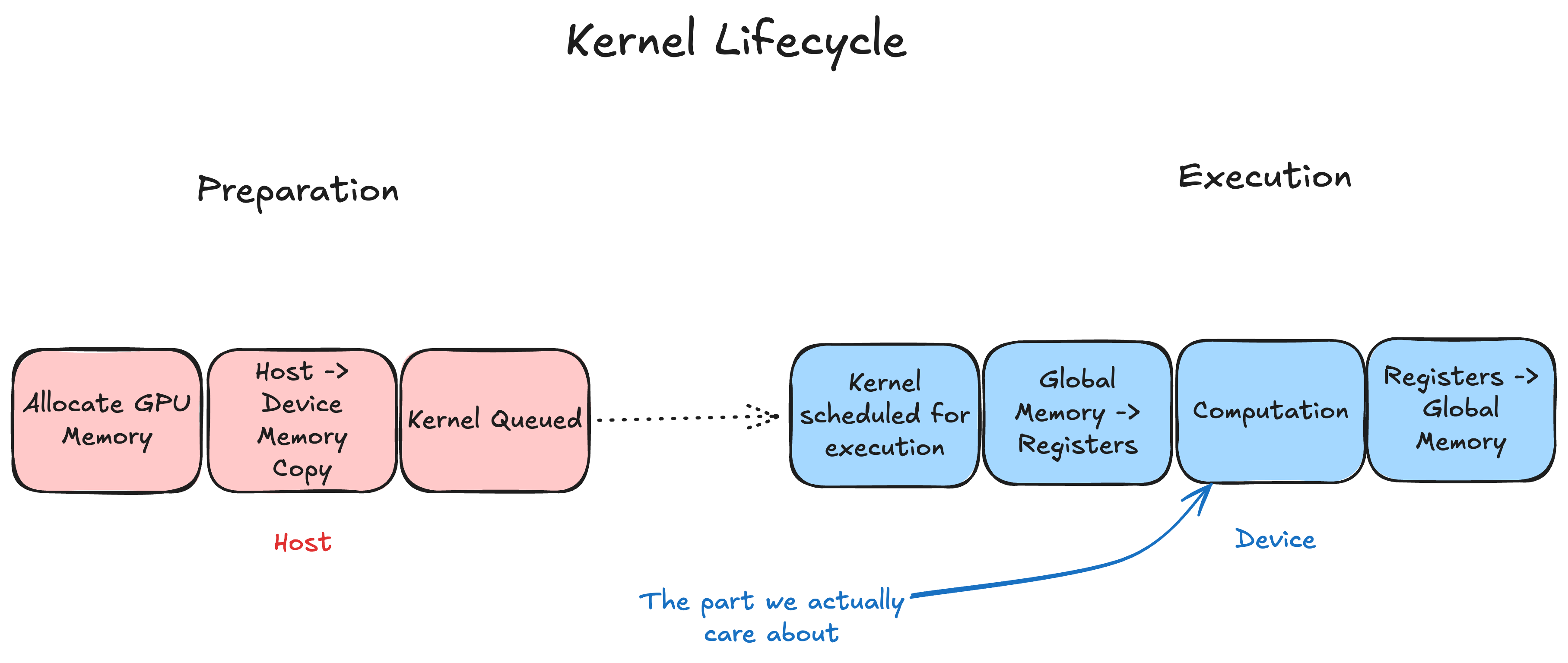 We can think of a kernel’s lifecycle as having two main parts:
- Host-side launch: The CPU prepares the kernel arguments, configures the launch parameters (such as grid and block sizes), and enqueues the kernel into a CUDA stream. A kernel launch is simply a CPU-side operation that schedules work for the GPU—it does not execute the computation itself.
- Kernel execution: The GPU scheduler picks up the kernel from the stream and executes it across many threads in parallel.
Within kernel execution, we can further break things down conceptually:
- Data movement: Data is loaded from global memory into registers (potentially passing through caches or shared memory).
- Computation: The actual computation takes place.
- Write-back: Results are written from registers back to global memory.
Within kernel execution, computation can only be carried out on data in registers, so all the data we want to work on must be moved from global memory to a register. The same dance must be carried out to move the data out from the registers and store it.
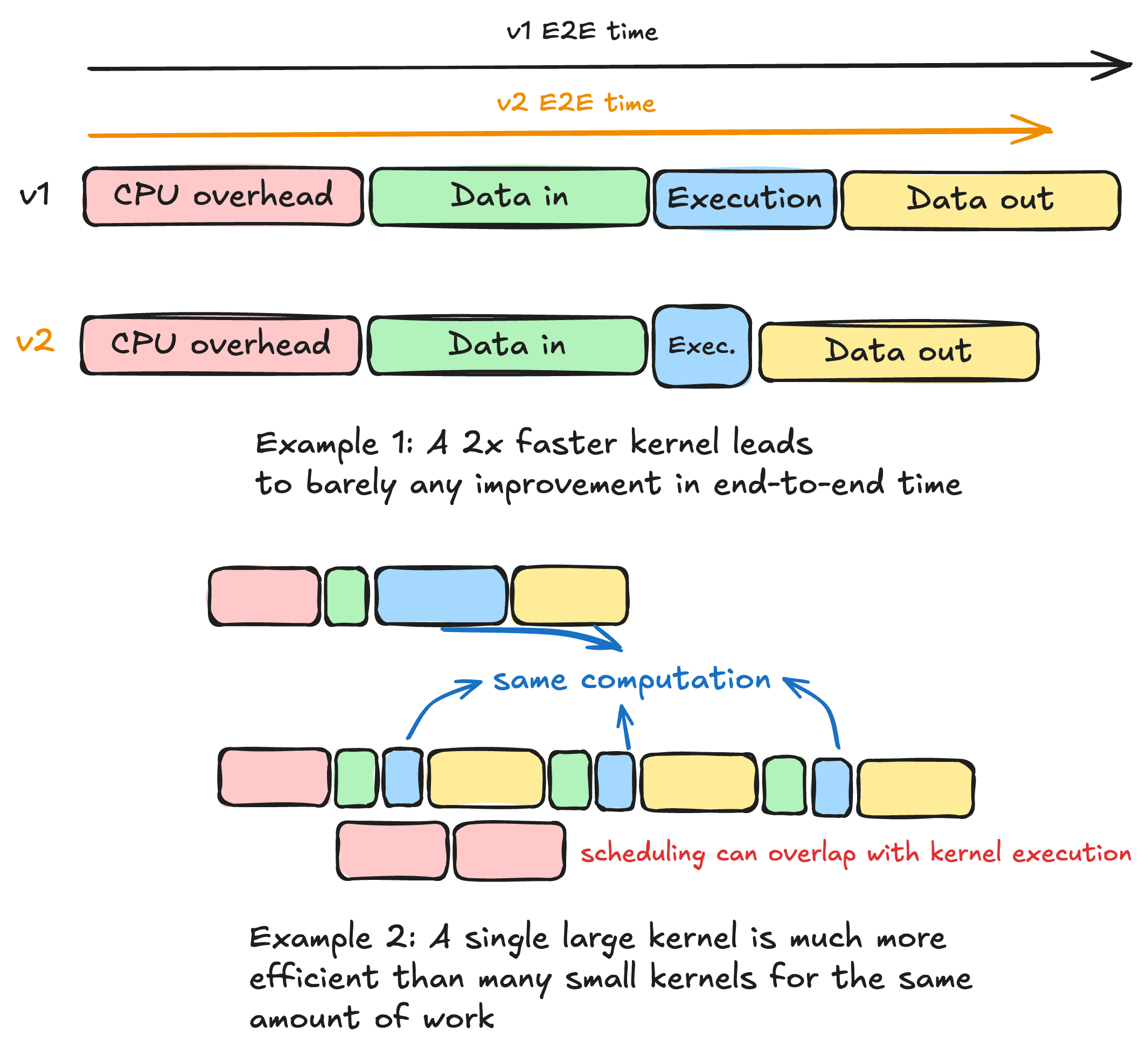
We can already start to see how the overhead of launching a kernel can stack up. The useful work is the kernel execution, and everything else is the scaffolding needed to do it efficiently. Host-side launch contains relatively fixed overheads, related to the CUDA API, which don’t depend on the kernel we are using or the data we operate on. We don’t usually pay much for this since it can be hidden by the asynchronous queuing of operations (we queue kernel 2 before kernel 1 finishes). But if our kernels are small, or there are many of them, this starts to become noticeable.
It is harder to make claims about phases 1 and 3 of the kernel execution, as the intensity of data movement depends on the data access patterns of the specific algorithm being executed. Let’s limit this analysis to the movement of data from the GPU’s global memory to the shared memory or registers. In an ideal case, where each data element only moves from global memory to registers (or shared memory) once, this cost also becomes largely fixed for a given input size. But depending on the algorithm we are running, phase 2 can vary greatly. It may sound like a strange concern to have, but what happens if our kernel execution is too fast?
Optimizing a kernel
As we see in the plots, a faster kernel is great, but we may find ourselves spending much longer doing setup than doing actual work! In that case, focusing on further improving the algorithm, by being more clever with how we write the kernel, gives us a tiny improvement in end-to-end runtime, which is what we actually care about. This is further intensified by the last decades of trends which have seen compute speed increase orders of magnitude faster than memory bandwidth and latency.
Given this understanding, we can actually make our operations faster without needing to know much about the CUDA implementation of our kernels. We just need to get kernels that do more work and launch fewer of them. This allows us to:
- Reduce the +- fixed CPU overhead associated with launching a kernel
- Improve the Arithmetic Intensity of our kernels (see Whats the best we can do?, in this case the FLOPs are the same but we move fewer bytes in total)
Kernel fusion
A popular way of doing this is called Kernel Fusion, and it does exactly what it sounds like. Let’s go over an example using a common pattern seen in neural networks:
- Add vectors x and y
- Multiply the result by a scalar
- Add a bias vector
- Apply ReLU to the result.
In torch, we might express this as:
def unfused_add_scale_bias_relu(x: torch.Tensor, y: torch.Tensor, scalar: float, bias: torch.Tensor):
    z = x + y
    z = z * scalar
    z = z + bias
    return torch.relu(z)
Pytorch will map each of these operations into kernel calls and execute them sequentially for us. We can take a profile and see what it looks like.
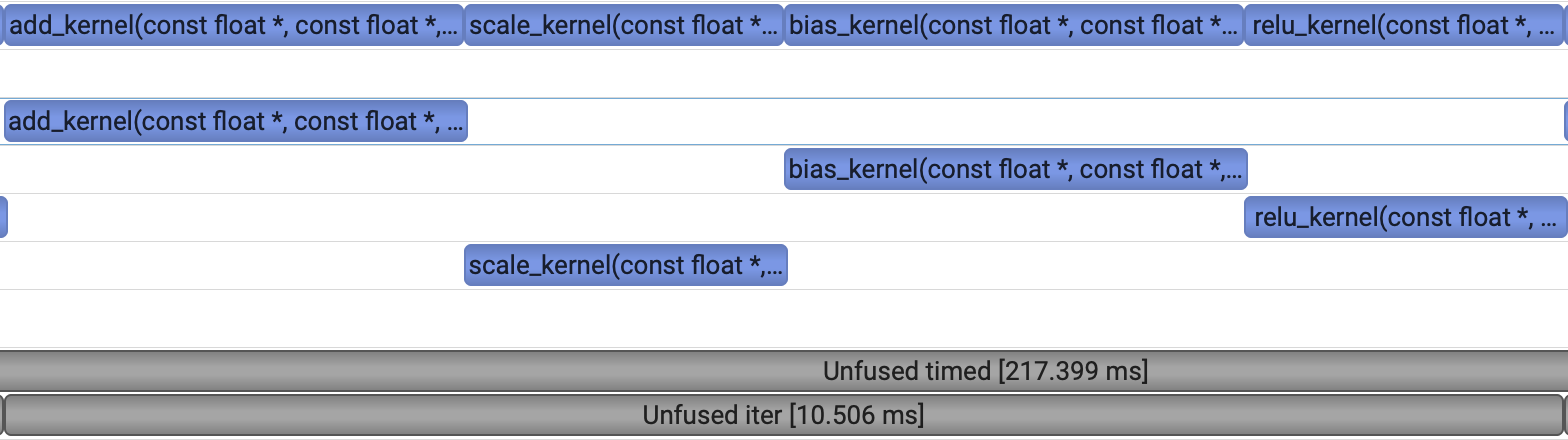
Notice that all of these operations are element-wise, which I admittedly have done on purpose. This an ideal candidate for an easy fusion, since the entire chain of operations has no interactions between different elements in the vectors. We don’t need any complex thread synchronization logic, since each thread will be able to fully compute an output element without information from any other thread! Let’s look at what our custom fused kernel would look like. For any output index i, the logic is simple:
- Load
x[i],y[i],scalarandbias[i] - perform
relu( (x[i] + y[i]) * scalar + bias) - store it in
z[i]
Each thread can handle an index of i independently, and we just need to launch as many of them as we would like. In triton, the important bit looks something like the following. I’ll make the full code available at the end of this post.
@triton.jit
def fused_kernel(x_ptr,  # Pointer to first input vector.
               y_ptr,  # Pointer to second input vector.
               scalar, # Float scalar
               bias_ptr, # Pointer to bias vector
               output_ptr,  # Pointer to output vector.
               n_elements,  # Size of the vector.
               BLOCK_SIZE: tl.constexpr,  # Number of elements each program should process.
	 # Bunch of setup code
	 # ...
	 # ...

	# load x y and bias - data in
	x = tl.load(x_ptr + offsets, mask=mask)
	y = tl.load(y_ptr + offsets, mask=mask)
	bias = tl.load(bias_ptr + offsets, mask=mask)

    # computation
    output = (x + y) * scalar + bias
    output = tl.math.max(output, 0.0)

    # data out
    tl.store(output_ptr + offsets, output, mask=mask)
Even in CUDA C++, such a kernel is not very hard to express, although it may not be the most performant implementation.
__global__ void fused_add_scale_bias_relu(const float *a, const float *b,
                                          const float *bias, float *out,
                                          float scalar, int n) {
    int i = blockIdx.x * blockDim.x + threadIdx.x;
    if (i < n) {
        float x = a[i] + b[i];
        x *= scalar;
        x += bias[i];
        out[i] = fmaxf(x, 0.0f);
    }
}
A profile of the C++ kernel looks like this:
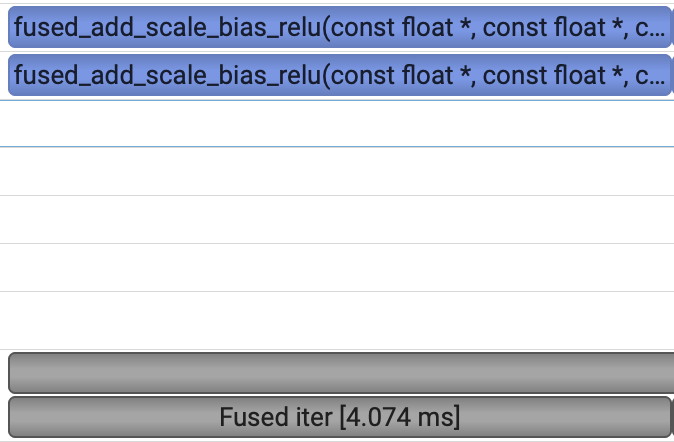
A single block, with a 2.5x performance improvement! We can safely assume that most of the savings come from no longer needing to write results into and out of global memory. This is a common benefit from fusion. For smaller kernels, operating on smaller vectors, the reduction in CPU overhead can also be beneficial.
Practical use-case - torch.compile
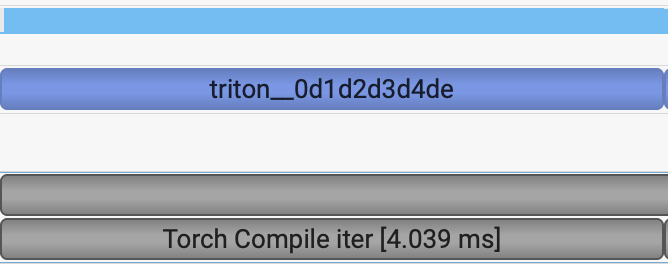
For such a simple case, in practice, you would probably not go and write your own kernel. Instead, this has a simple one-line implementation thanks to torch compile:
@torch.compile
def unfused_add_scale_bias_relu(x: torch.Tensor, y: torch.Tensor, scalar: float, bias: torch.Tensor):
    z = x + y
    z = z * scalar
    z = z + bias
    return torch.relu(z)
Torch.compile often actually generates triton code, and in this case it achieves the same performance as our own C++ kernel. However its important to note that for many cases torch.compile won’t achieve the same performance as a hand-written kernel (a good case study on this is flash attention).
Conclusion
We should now have a good understanding of what a kernel is and how it runs. We’ve also seen how this can be enough to reason about bottlenecks in our code and eliminate them, without needing to know about the nitty gritty details of how performant CUDA kernels are written. Finally, we saw how we can apply torch.compile while understanding +- what its actually doing to achieve speed-ups.
Code
import torch

import triton
import triton.language as tl

DEVICE = torch.device("cuda:0")


@triton.jit
def fused_kernel(x_ptr,  # *Pointer* to first input vector.
               y_ptr,  # *Pointer* to second input vector.
               scalar,
               bias_ptr,
               output_ptr,  # *Pointer* to output vector.
               n_elements,  # Size of the vector.
               BLOCK_SIZE: tl.constexpr,  # Number of elements each program should process.
               ):

    pid = tl.program_id(axis=0)  # We use a 1D launch grid so axis is 0.
    block_start = pid * BLOCK_SIZE
    offsets = block_start + tl.arange(0, BLOCK_SIZE)
    # Create a mask to guard memory operations against out-of-bounds accesses.
    mask = offsets < n_elements
    # Load x and y from DRAM, masking out any extra elements in case the input is not a multiple of the block size
    x = tl.load(x_ptr + offsets, mask=mask)
    y = tl.load(y_ptr + offsets, mask=mask)
    bias = tl.load(bias_ptr + offsets, mask=mask)
    output = (x + y) * scalar + bias
    output = tl.math.max(output, 0.0)
    tl.store(output_ptr + offsets, output, mask=mask)

def add_scale_bias_relu(x: torch.Tensor, y: torch.Tensor, scalar: float, bias: torch.Tensor):
    # We need to preallocate the output.
    output = torch.empty_like(x)
    assert x.device == DEVICE and y.device == DEVICE and bias.device == DEVICE and output.device == DEVICE
    n_elements = output.numel()
    # The SPMD launch grid denotes the number of kernel instances that run in parallel.
    # It is analogous to CUDA launch grids. It can be either Tuple[int], or Callable(metaparameters) -> Tuple[int].
    # In this case, we use a 1D grid where the size is the number of blocks:
    grid = lambda meta: (triton.cdiv(n_elements, meta['BLOCK_SIZE']), )
    # NOTE:
    #  - Each torch.tensor object is implicitly converted into a pointer to its first element.
    #  - `triton.jit`'ed functions can be indexed with a launch grid to obtain a callable GPU kernel.
    fused_kernel[grid](x, y, scalar, bias, output, n_elements, BLOCK_SIZE=256)
    return output

def unfused_add_scale_bias_relu(x, y, scalar, bias):
    tmp = x + y
    tmp = tmp * scalar
    tmp = tmp + bias
    return torch.relu(tmp)

# benchmarking function. Use nvtx to label nsys profile
def benchmark(fn, label, warmup=5, iters=20):
    torch.cuda.nvtx.range_push(f"{label} warmup")
    for _ in range(warmup):
        fn()
    torch.cuda.synchronize()
    torch.cuda.nvtx.range_pop()

    start = torch.cuda.Event(enable_timing=True)
    end = torch.cuda.Event(enable_timing=True)

    torch.cuda.nvtx.range_push(f"{label} timed")
    start.record()
    for _ in range(iters):
        torch.cuda.nvtx.range_push(f"{label} iter")
        fn()
        torch.cuda.nvtx.range_pop()
    end.record()
    torch.cuda.synchronize()
    torch.cuda.nvtx.range_pop()

    return start.elapsed_time(end), iters


torch.manual_seed(0)
N = 64 * 1024 * 1024  # 64M floats, same as CUDA benchmark
x = torch.rand(N, device=DEVICE)
y = torch.rand(N, device=DEVICE)
bias = torch.rand(N, device=DEVICE)
scalar = 0.5

compiled = torch.compile(unfused_add_scale_bias_relu)

# --- Correctness check ---
out_unfused = unfused_add_scale_bias_relu(x, y, scalar, bias)
out_fused = add_scale_bias_relu(x, y, scalar, bias)
out_compiled = compiled(x, y, scalar, bias)
max_diff = torch.max(torch.abs(out_unfused - out_fused)).item()
max_diff_compiled = torch.max(torch.abs(out_unfused - out_compiled)).item()
assert max_diff < 1e-5, f"MISMATCH: max diff = {max_diff}"
print("Correctness: PASS")
assert max_diff_compiled < 1e-5, f"MISMATCH: max diff compiled = {max_diff}"
print("Correctness: PASS")

# --- Benchmark ---
WARMUP = 5
ITERS = 20

ms_unfused, _ = benchmark(lambda: unfused_add_scale_bias_relu(x, y, scalar, bias), "Unfused", WARMUP, ITERS)
ms_fused, _ = benchmark(lambda: add_scale_bias_relu(x, y, scalar, bias), "Fused", WARMUP, ITERS)
ms_compiled, _ = benchmark(lambda: compiled(x, y, scalar, bias), "Compiled", WARMUP, ITERS)
print(f"Unfused (4 PyTorch ops): {ms_unfused:.3f} ms  (avg {ms_unfused / ITERS:.3f} ms/iter)")
print(f"Fused   (1 Triton kern): {ms_fused:.3f} ms  (avg {ms_fused / ITERS:.3f} ms/iter)")
print(f"Compiled (1 Triton kern): {ms_compiled:.3f} ms  (avg {ms_compiled / ITERS:.3f} ms/iter)")
print(f"Speedup ours: {ms_fused / ms_unfused:.2f}x")
print(f"Speedup torch compile: {ms_compiled / ms_unfused:.2f}x")