GPU Optimization for ML Practitioners: Start Here
You can build models in PyTorch, understand backpropagation, and read architecture papers. But when your training loop takes hours instead of minutes, or inference is too slow for production, the usual ML knowledge doesn’t help. What actually makes GPU code fast? When should you care about kernels? How do you even start optimizing?
A year ago, I moved to a role where performance was critical, and I realized my PyTorch fluency wasn’t enough. I decided to start documenting my learning in this series of posts, bridging the gap from ML practitioner to someone who can actually make code faster on a gpu—starting from zero HPC experience.
Current posts in this series:
- The starting point (You’re here!)
- Whats the best we can do?
- …
ML applications - Hybrid computing
To understand an ML application, we have to understand the fundamentally hybrid nature of the system we execute it on. When running a PyTorch application, we are executing Python code. This runs on our CPU, with access to the local memory. (This is called the host).
However, the real meat of our application runs on the GPU, which specializes in fast massive parallel computation, with its own processors and memory. We want the heavy duty computations to be offloaded to the GPU, while our CPU orchestrates the rest. How can we speed up such a program?
The code below is an example of a simple program that leverages the GPU in PyTorch.
import torch

H, W, K = 1024, 2048, 8192

A = torch.randn(H, K)
B = torch.randn(K, W)
C = torch.randn(H, W)

# multiply A and B
intermediate = A.cuda() @ B.cuda()

# depending on the result, add or subtract C
if intermediate.sum() % 2:
	output = intermediate + C.cuda()
else:
	output = intermediate - C.cuda()

print(output)

output = output * 2
GPU execution - Kernels
The first place we might think to speed up is where the heavy computation takes place. In this case, A @ B and intermediate +/- c.
These operations take place on the GPU, and torch eventually dispatches kernels to execute them. They are critical components, and we will dive deeper into them in another post.
However, the truth is hundreds of thousands of hours have been poured into optimizing kernels for common operations (especially matrix multiplications, known as General Matrix Multiplications - GEMMs). While they are fascinating to study, it is unlikely we can squeeze much more performance out of such kernels, unless there is some interesting specificity in our operations that allow for a weird optimization.
Custom kernels make sense when you have domain-specific operations or unusual memory access patterns—but for most practitioners, the bigger wins are elsewhere. In that case, what else is there to optimize?
Host execution
Despite making use of GPUs, the programs we write are launched and handled by the CPU. The kernels may be blazingly fast, but if we are not careful about how we handle the interaction between cpu and gpu, all of that may be for naught. Let’s take a step back and understand the execution flow between CPU and GPU in a PyTorch program.
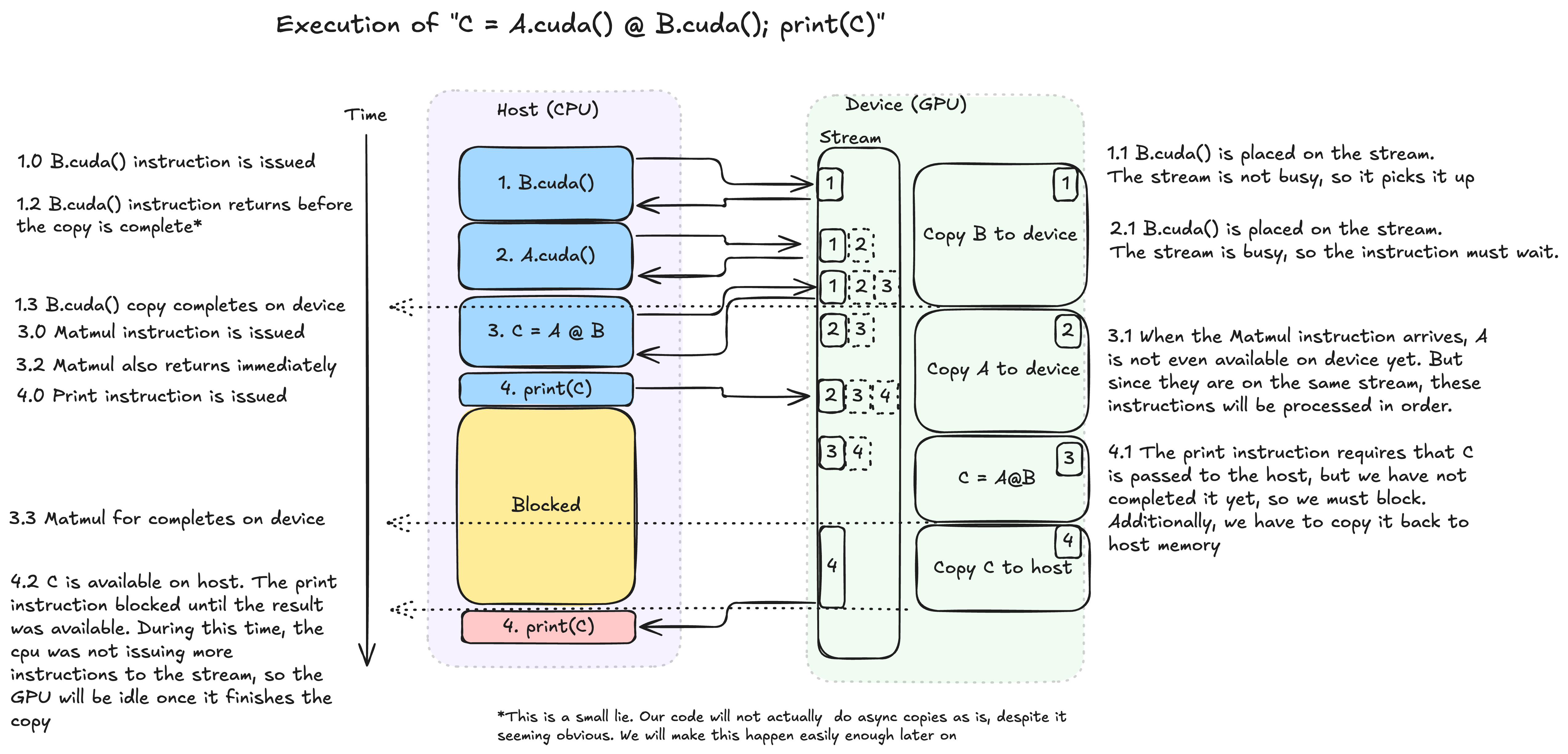
The diagram shows how the hybrid nature goes hand-in-hand with an asynchronous execution model. Looking at it, we can already see there many opportunities for optimization, without digging into kernels.
The CPU is the orchestrator, aware of the big picture of operations that must happen, and delegating them to the GPU. The GPU, on the other hand, just takes instructions from a stream (think queue) and executes them in a FIFO manner. While the GPU is busy, rather than waiting around, the CPU can ideally continue queueing tasks for the GPU. This simple mechanism allows us to hide the latency inherent in issuing instructions from the host to the device. We can do this despite not yet having the results available (or even on host memory) whenever the host’s execution does not depend on an intermediate result. But we are not always lucky enough to be able to do this.
The print instruction is a clear example of this. The print instruction will output the python representation of the C object to the host’s standard output stream. In order to do this, we must have the value of C. Therefore, the python interpreter has no choice but to wait until this value has been computed and moved onto host memory. Situations like these are called synchronization points. They are harmful for the performance of our programs as they leave the GPU with an empty stream until we are done with whatever work we do on the host side (in this case, the expensive writing to standard out), exposing the latency between host and device.
There are some sneakier examples of this that slow down our programs unexpectedly. Look at our code above. Can you spot the other synchronization point? This is an implicit synchronization, where the host must wait for a result on device in order to continue execution. In this case, the problem is the if statement.
if intermediate.sum() % 2: # intermediate.sum() lives on the gpu, but % 2 is performed by cpu code. It must make its way to the cpu somehowIn order to decide which execution branch to follow, the host must know the result of the intermediate value! There is a trade-off here between explicit control and ease-of-use: PyTorch is “nice” to us by not requiring us to explicitly write a synchronization instruction followed by a copy, but, in doing so, sneaks this unoptimized code past us.
Branching execution
Situations as above are extremely common in the
forward()method of models. However, we can usually work around them by replacing theifwith additional computation on device. In the case above, we can do something like:# If sum is odd: multiplier = 1, if even: multiplier = -1 multiplier = (intermediate.sum() % 2) * 2 - 1 output = intermediate + (C.cuda() * multiplier)For more general cases, where the condition can even be element specific, we often turn to torch.where(). This is a slightly degenerate use-case since our condition will be the same for all elements of the tensor, but we can still use it thanks to broadcasting semantics.
condition = (intermediate.sum() % 2).bool()
# Build a tensor which combines the second and third arguments. Where condition is True, take from the second argument. Where it is False, take from the third.
output = torch.where(condition, intermediate + C_gpu, intermediate - C_gpu)
Going Further
Removing sync points can result in very large speed-ups for our applications, and can all be done without delving deeper than Pytorch level. For extra points, there are a few other things we can do to improve the latency overheads of our applications.
Hiding as much of the Host-Device latency as possible is a big optimization area. A very interesting technique is CUDA Graphs. This is considerably more advanced, so we won’t go into it here, but I highly recommend reading through the linked blog post.
We can also look at the overhead of launching the kernels themselves on the device. This is no longer related to the host, but rather to the work required in setting up a kernel so it can run, and extracting results after (notably copying values from the GPU global memory to cache/registers, and writing results back to global memory). You may have heard of Kernel Fusion, where we try to amortize this cost by fusing two or more kernels into one.
Feeding a gpu
Another low-hanging fruit we can optimize is reducing the movement of data from host to device and vice-versa.
Bandwidth vs Compute
A modern GPU is capable of achieving a mind-blowing amount of operations per second (FLOPs/s). For an NVIDIA B200 GPU, the peak number for FP32 operations is 75 teraFLOPs/s. This number falls squarely into the category of things so large that adding or removing a couple of 0s is indistinguishable to us. But it also means that every second that this GPU is not computing is an incredibly painful opportunity cost.
Compare that to the bandwidth between the host and the GPU. If you’re running a typical x86 system with a B200, you will have a peak of *63GB/s unidirectional bandwidth. Those 2 numbers are not directly comparable, but let’s try to make them so. For a matrix multiplication like the one in our program, the result of matrix multiplication will have dimensions HxW.
For each of those elements, we need to do K multiplications and K-1 additions Total: ~HxWx(2K) operations = 1024 x 2048 x 2 x 8192 operations / 75tf = 0.458ms
In order to get the input data onto the device, we need to transfer HxK + KxW elements, each with 4 bytes. Total: 4 x (HxK + KxW) bytes = 4 x (1024 x 8192 + 8192 x 2048) bytes / 63GB/s = 1.5ms
So in the time it takes us to get the initial data onto the GPU, it could have done the computation we care about 3 times. This is why operations such as A = torch.randn(H, K).cuda() may look innocent but are actually quite detrimental.
In this case, the solution is usually quite straight-forward. Whenever possible, we should initialize tensors where they will be used. PyTorch allows us to pass a device argument at initialization which does exactly this. If you’ve used PyTorch Lightning before, you may already be doing this, even if not exactly for this reason.
## there is a huge difference between
A = torch.randn(H, K).to(device)
## and
A = torch.randn(H, K, device=device)
However, this is often not possible. A common example is when we need to load a training batch from disk, through the CPU, and pass it to the GPU. In this case, it is crucial that we make this transfer happen asynchronously*, as I showed in the diagram.
It might be confusing why this does not automatically happen asynchronously, as with other kernels. The device is the one doing the copying, not the host, so the host should not need to be involved… The reason is that the device has no guarantees on what the host will do with that memory as it copies it. It might deallocate it, or swap out the page it belongs to. In order to enable this transfer, we need to pin the memory, essentially promising the device that the host won’t touch that memory. Once this is done, we can enable the non_blocking argument in .to(). The code for this is very straight forward.
A = get_training_data().pin_memory().to(device, non_blocking=True)Wrapping up
What does our final code look like?
import torch

H, W, K = 1024, 2048, 8192

A = torch.randn(H, K, device="cuda")
B = torch.randn(K, W, device="cuda")
C = torch.randn(H, W, device="cuda")

# multiply A and B
intermediate = A @ B

multiplier = (intermediate.sum() % 2) * 2 - 1
output = intermediate + (C * multiplier)

output = output * 2
A great way to check understand what’s happening and how to improve is to look at a profile. This traces our program and gives us a breakdown of which operations are running at what time.An Nsys profile is a great way to extract this information, but in this case, I ran the more lightweight torch profiler, which yields a .json file we can look at using chrome://tracing.

As usual, after analyzing a profile, the optimization work never stops, theres always more we can shave down! In this toy example we don’t care but, for instance, why do we spend so much time initializing the first tensors?…
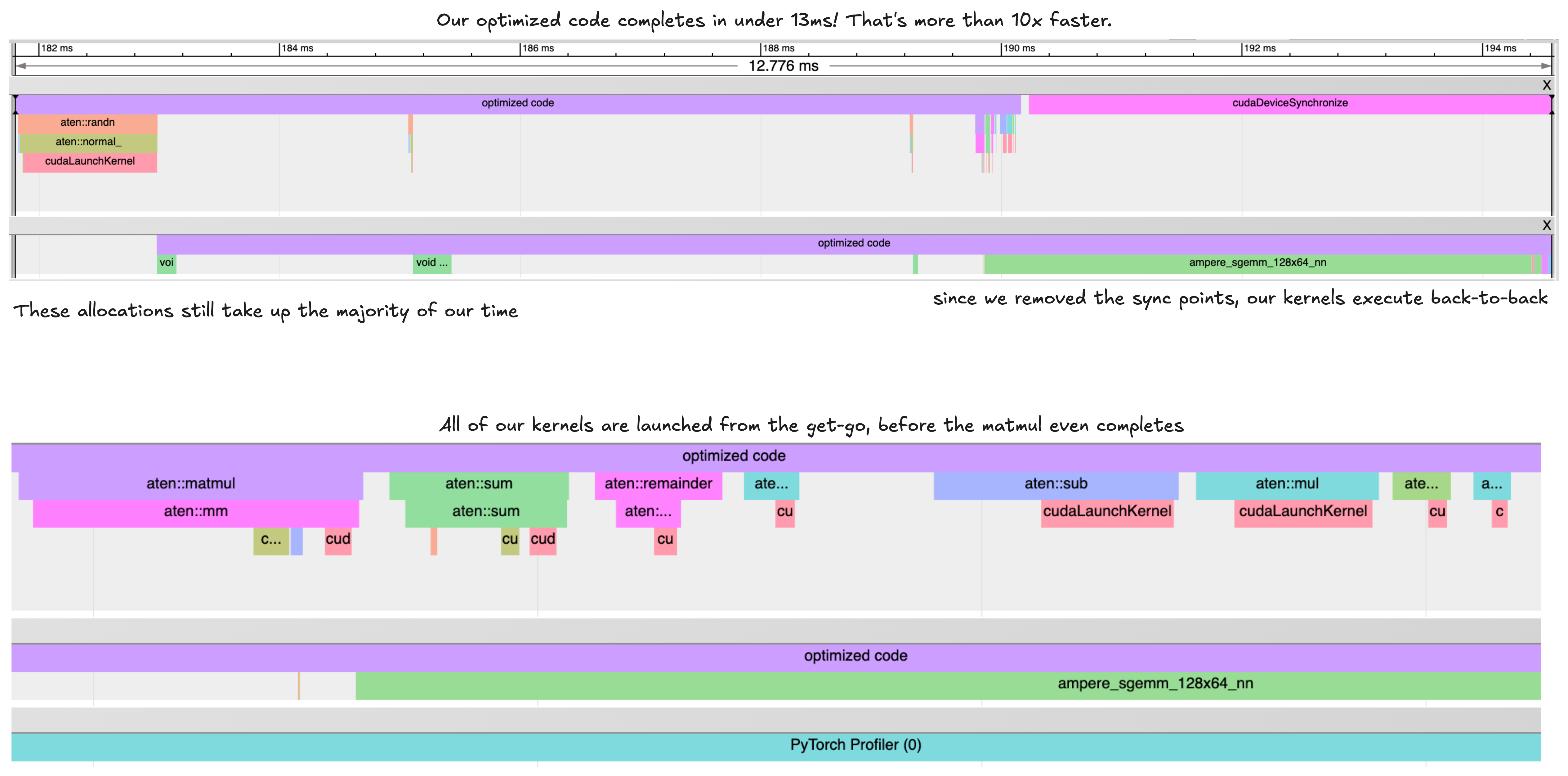 Let’s summarize the quick performance wins we can get from our applications:
- Initialize tensors on device when possible
- Replace host-side conditionals with
torch.where - Remove unnecessary
print()or.item()calls - Use
pin_memory()+non_blocking=Truefor data loading - Profile your code to find problematic sections